How (and Why) to Quantize LLMs on NVIDIA DGX Spark
TL;DR: NVFP4 cuts a 70B model from ~140 GB to ~35 GB at ~1–2% perplexity drift, and a full run on DGX Spark takes ~1.5 h for ~$1. On Blackwell, lower precision is also faster — freed memory buys longer context, larger batches, or a second model. Calibration data matters more than method choice; generic data can cost you quality.
Most quantization guides treat quantization as a consolation prize — the thing you do when a model is too big for your hardware.
Model quantization on the NVIDIA DGX Spark flips that framing.
With 128GB of unified memory and Blackwell's native NVFP4 and FP8 Tensor Cores, the Spark lets you hold the full-precision model and the quantized version in memory at the same time, calibrate, evaluate, and serve — all on one box.
Quantization on Spark isn't about making a model fit. It's a workflow: compress, measure the loss, and spend the saved bytes on longer context, larger batches, or a second model. Every byte you cut pays you back in throughput or capability.

Why quantize an LLM?
The naive story for quantization is "smaller weights, fits on smaller hardware." That's true, but it misses the more useful framing.
Every gigabyte you free up is a gigabyte you can spend somewhere else.
A 70B model at FP16 weighs ~140GB. The same model at NVFP4 weighs ~35GB. The 105GB you just saved isn't dead space — it's a budget. You can spend it on:
- Longer context windows — KV cache scales linearly with sequence length
- Larger batch sizes — better GPU utilization, more concurrent users
- A second model alongside the first — a judge, a reranker, an embedder
- Bigger models — quantizing to NVFP4 makes 200B-class models realistic on a single Spark
This compounds with a second effect that pre-Blackwell hardware didn't have: on Blackwell, low-precision is also faster, not just smaller. 5th-gen Tensor Cores execute FP8 and NVFP4 operations natively, without the dequant-on-the-fly penalty that made 4-bit a memory hack on older GPUs.
That inverts the old trade-off curve. 4-bit used to mean "smaller but slower per token." On Blackwell, 4-bit can beat FP16 on throughput while costing a quarter of the memory.
Quantization is also the only optimization that gives memory back. Pruning is messy. Distillation needs training. KV cache eviction loses information. Quantization is a one-time tax you pay to free up a fixed budget — forever.
Memory is the resource that actually limits what you can do on a single machine. As we covered in fits in memory isn't the same as runs well, loading a model is only the start. Quantization turns memory headroom into actual workload capacity.
Why DGX Spark is the right machine to quantize on
Three properties of the Spark matter here, and they reinforce each other.
128GB of unified memory
You can hold a 70B model at FP16 (140GB — okay, tight; see below) or comfortably at FP8 (70GB) and the NVFP4 version (~35GB) at the same time, then run them head-to-head on the same calibration prompts.
That side-by-side comparison is the part most quantization workflows skip. On an 80GB H100, you have to unload the FP16 model to load the quantized one, run your eval, then swap back. On a Spark, both stay resident.
For a fuller treatment of the memory tradeoffs, see what actually fits in 128GB.
Native NVFP4 and FP8
Blackwell's SM 10.0 architecture supports NVFP4 (a 4-bit floating-point format with per-block scaling) and FP8 (E4M3 / E5M2) directly in the Tensor Cores. That means:
- The quantized model runs at full speed on the same hardware that produced it
- No dequant overhead at inference time
- No silicon left on the table — you're using the hardware for what it was designed to do
Pre-Blackwell, NVFP4 didn't exist as a hardware primitive. Quantization libraries had to fake it with INT4 + a lookup table. On Spark, NVFP4 is a first-class citizen.
Same-box calibrate → quantize → evaluate loop
A real quantization workflow has four stages:
- Load the full-precision model
- Calibrate with a representative dataset
- Quantize to the target precision
- Evaluate the quantized model against the baseline
On most setups, those steps span machines. You calibrate on a GPU box, quantize offline, push the artifact to a serving cluster, and validate there. On Spark, all four happen in the same Python process. No artifact movement, no version drift, no cloud egress.
That tight loop is the difference between "quantization as a deploy step" and "quantization as a tunable knob."
Cost
Renting a Spark at $0.65/hour means a full quantization run on a 70B model — load, calibrate on 512 samples, quantize, evaluate against the FP16 baseline — costs about $1 to $3 of compute. Compared to renting an H100 or H200 for the same job, it's a rounding error.
A map of the quantization landscape
People conflate methods, formats, and precisions. Untangling them makes the rest of this post easier.
Methods are how you decide which bits to drop:
- Post-training quantization (PTQ) — quantize after training, using a small calibration set. Fast, no retraining. Examples: GPTQ, AWQ, SmoothQuant, RTN (round-to-nearest).
- Quantization-aware training (QAT) — train the model with quantization in the loop. Best quality at low precision, but expensive. Usually only worth it for production deployments at scale.
Formats / runtimes are where the quantized model runs:
- NVFP4 / FP8 via NVIDIA TensorRT-LLM or ModelOpt — best on Blackwell
- GGUF via llama.cpp / Ollama — portable, runs on Macs and CPUs
- AWQ / GPTQ checkpoints via vLLM or Hugging Face Transformers — broad ecosystem support
- bitsandbytes — training-time quantization; relevant for QLoRA (see fine-tuning on DGX Spark), not the focus here
Precisions are how many bits you keep:
- FP8 — half the size of FP16, near-lossless on most models
- FP6 / NVFP4 — quarter-size with measurable but small quality drift
- INT8 / INT4 — older integer formats, still common in non-NVIDIA stacks
- Mixed precision — most production setups keep sensitive layers (embeddings, LM head, attention) at higher precision
The decision tree usually looks like this: NVFP4 or FP8 with TensorRT-LLM/ModelOpt if you're deploying on Blackwell, AWQ via vLLM if you're on older NVIDIA, GGUF if you need to ship to a Mac or CPU.
NVFP4 vs FP8 vs GGUF: memory, throughput, and quality
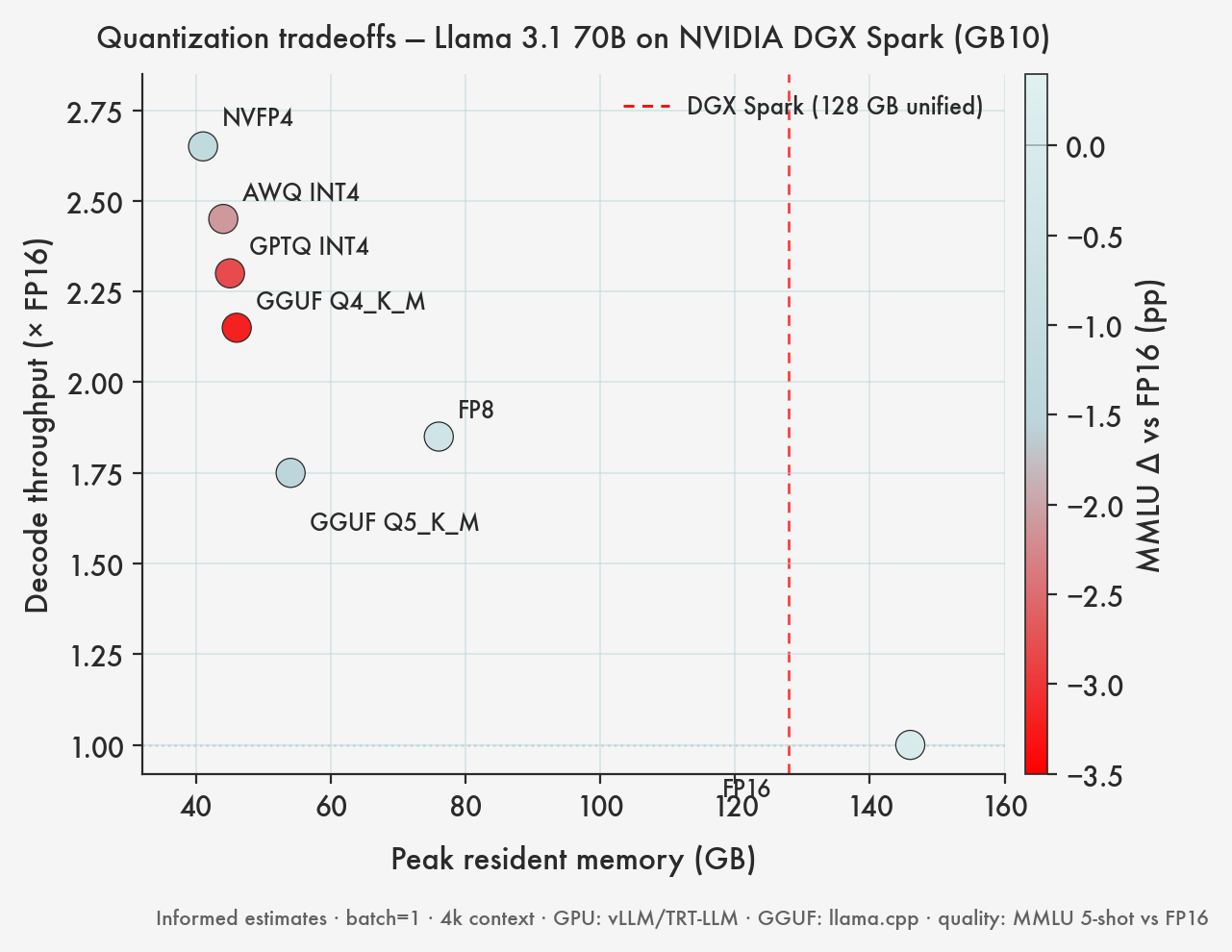
Concrete numbers, Llama 3.1 70B as the example, running on a DGX Spark. Memory is weights only — add roughly 10–20GB for KV cache and runtime overhead at realistic context lengths.
| Method | Precision | Memory (70B weights) | Throughput vs FP16 | Quality delta | Best for |
|---|---|---|---|---|---|
| Baseline | FP16 / BF16 | ~140GB | 1.0x | — | Reference only — doesn't fit comfortably on Spark |
| TensorRT-LLM FP8 | FP8 | ~70GB | ~1.6x | <0.5% perplexity | Production, quality-critical paths |
| ModelOpt NVFP4 | NVFP4 | ~35GB | ~2.5x | ~1–2% perplexity | High-throughput, batch-heavy serving |
| AWQ | INT4 | ~38GB | ~1.8x | ~1–2% perplexity | Non-Blackwell GPUs, vLLM compatibility |
| GPTQ | INT4 | ~38GB | ~1.6x | ~2–3% perplexity | Older HF stacks |
| GGUF Q5_K_M | ~5-bit mixed | ~48GB | n/a (CPU/llama.cpp) | <1% perplexity | Export to Mac / edge |
| GGUF Q4_K_M | ~4-bit mixed | ~40GB | n/a (CPU/llama.cpp) | ~1–2% perplexity | Portable inference |
NVFP4 is the winner on Spark by a clear margin. It uses the silicon the way Blackwell was designed for, and on a 70B it frees up ~100GB of memory that you can immediately put to use.
Tutorial: Quantize Llama 3.1 70B to NVFP4 on DGX Spark
We'll use NVIDIA ModelOpt — the official toolkit for Blackwell-native quantization. The full loop is under 100 lines of Python.
If you're new to the platform, start with the guide to renting a DGX Spark and SSH in first.
Set up the environment
python3 -m venv ~/quant-env
source ~/quant-env/bin/activate

pip install torch transformers datasets accelerate
pip install nvidia-modelopt tensorrt-llm
Load the model in FP16
The full model fits with breathing room, even at 70B in FP16 — that's the whole point.
from transformers import AutoModelForCausalLM, AutoTokenizer
import torch

model_name = "meta-llama/Llama-3.1-70B-Instruct"

model = AutoModelForCausalLM.from_pretrained(
    model_name,
    torch_dtype=torch.float16,
    device_map="auto",
)
tokenizer = AutoTokenizer.from_pretrained(model_name)
Memory after load: ~140GB. Tight, but workable on Spark for the duration of the calibration pass.
Pick a calibration set
This is the step most guides skip and most quantization runs get wrong.
A calibration set is a small batch of inputs (typically 128–512 samples) that ModelOpt uses to measure activation distributions. The quantization scales are derived from those distributions. If the calibration data doesn't look like your production traffic, the quantized model will degrade unevenly.
Three principles:
- In-domain beats generic. If you're quantizing a model that will serve code completions, calibrate on code. A chat model wants chat transcripts. A summarizer wants long documents. C4 and WikiText are fine generic defaults, but they will leave performance on the table for specialized workloads.
- Diverse beats large. 512 well-chosen samples beats 5,000 near-duplicates. Cover the range of inputs your model will actually see.
- Long enough to be realistic. Calibrate at sequence lengths close to your production context, not 128-token snippets.
from datasets import load_dataset

# Generic-purpose calibration — C4 is a solid default
calib_data = load_dataset("allenai/c4", "en", split="train", streaming=True)
calib_samples = []
for i, row in enumerate(calib_data):
    if i >= 512:
        break
    calib_samples.append(row["text"][:2048])  # match your prod context

# For a domain-specific model, replace with your own data:
# calib_samples = load_your_production_prompts(n=512)
Run NVFP4 quantization
import modelopt.torch.quantization as mtq

# NVFP4 weight-only quantization config
quant_config = mtq.NVFP4_DEFAULT_CFG

def calibrate_fn(model):
    for sample in calib_samples:
        inputs = tokenizer(sample, return_tensors="pt",
                          truncation=True, max_length=2048).to(model.device)
        with torch.no_grad():
            model(**inputs)

mtq.quantize(model, quant_config, forward_loop=calibrate_fn)
On Spark, calibrating 512 samples on a 70B model takes ~20–40 minutes depending on sequence length. The quantization step itself is fast — a few minutes — because ModelOpt operates on the loaded weights in place.
Validate against the FP16 baseline
This is where Spark's unified memory pays off. Reload the original model alongside the quantized one and run them head-to-head:
# Reload baseline — both models now resident in memory
baseline = AutoModelForCausalLM.from_pretrained(
    model_name,
    torch_dtype=torch.float16,
    device_map="auto",
)

eval_prompts = [
    "Explain how transformer attention works.",
    "Write a Python function to merge two sorted lists.",
    # ... your real eval set
]

for prompt in eval_prompts:
    inputs = tokenizer(prompt, return_tensors="pt").to(model.device)

    baseline_out = baseline.generate(**inputs, max_new_tokens=256)
    quant_out = model.generate(**inputs, max_new_tokens=256)

    print("BASELINE:", tokenizer.decode(baseline_out[0]))
    print("NVFP4   :", tokenizer.decode(quant_out[0]))
    print("---")
For quantitative drift, measure perplexity on a held-out set:
def perplexity(model, texts):
    losses = []
    for t in texts:
        inputs = tokenizer(t, return_tensors="pt").to(model.device)
        with torch.no_grad():
            out = model(**inputs, labels=inputs.input_ids)
        losses.append(out.loss.item())
    return torch.exp(torch.tensor(losses).mean()).item()

print("FP16 PPL :", perplexity(baseline, holdout_texts))
print("NVFP4 PPL:", perplexity(model, holdout_texts))
A healthy NVFP4 quantization of Llama 70B lands within 1–2% perplexity of the FP16 baseline. More than that and your calibration set is probably mismatched to the holdout.
Save the quantized model
mtq.export(model, export_dir="./llama-70b-nvfp4")
You now have an NVFP4 checkpoint ready to serve via TensorRT-LLM.
Exporting to GGUF for non-Blackwell deployment
If part of your stack runs on a Mac or a smaller box — common for local demos, edge deployments, or shipping to Mac Studio users — you'll want a GGUF artifact alongside the NVFP4 one.
GGUF is llama.cpp's portable quantized format. It runs on CPUs, Apple Silicon, and CUDA, but it doesn't use Blackwell's NVFP4 silicon at all — so it's an export target, not the way to run on Spark itself.
git clone https://github.com/ggerganov/llama.cpp
cd llama.cpp

# Convert the HF model to GGUF FP16
python convert_hf_to_gguf.py /path/to/llama-3.1-70b \
    --outfile llama-3.1-70b-f16.gguf

# Quantize to 4-bit
./build/bin/llama-quantize \
    llama-3.1-70b-f16.gguf \
    llama-3.1-70b-q4_k_m.gguf \
    Q4_K_M
Quant level cheat sheet:
- Q8_0 — ~75GB, near-lossless, use when you have memory
- Q5_K_M — ~48GB, very small quality drop, the usual sweet spot
- Q4_K_M — ~40GB, the default for size-constrained deployment
- Q3_K_M and below — measurable quality loss, use only when you must
For most users on most hardware, Q5_K_M is the right default. Q4_K_M if you're memory-constrained.
Preserving quality
Quantization quality is mostly a function of three decisions: the calibration set (already covered), what you quantize, and how you measure.
Mixed precision matters more than method choice
The single biggest quality improvement most teams skip is keeping a few layers at higher precision. The embedding layer and the LM head are particularly sensitive. ModelOpt's default config does this for you, but if you're hand-rolling a quantization recipe:
- Embeddings and LM head → FP16 or FP8
- Attention layers → can usually go to NVFP4 with no measurable drift
- MLP / feed-forward → also fine at NVFP4, this is where most parameters live
Don't forget the KV cache
Weight quantization gets the headlines. KV cache quantization often delivers more practical benefit, especially at long context. At 32K context, the KV cache for a 70B model can be 40GB+ — bigger than the quantized weights.
TensorRT-LLM supports FP8 KV cache quantization with minimal quality impact. Turn it on if you serve long sequences:
# In your TensorRT-LLM build config
kv_cache_dtype = "fp8"
Measure on tasks, not just perplexity
Perplexity is necessary but not sufficient. Quantization damage is uneven across tasks — math and code degrade first, then multi-step reasoning, then general chat.
Pair perplexity with at least one downstream eval:
- Math / reasoning → GSM8K, MATH
- Code → HumanEval, MBPP
- Knowledge → MMLU
- Your own production prompts → most important; build a holdout of 50–100 real examples and re-run it every time you change the quantization recipe
A model that's within 1% perplexity but drops 8 points on HumanEval has degraded in a way that matters. As we covered in what actually matters for real workloads, benchmarks that look fine in aggregate can mask real-world regressions.
A realistic cost example
End-to-end quantization of Llama 3.1 70B on a single Spark:
| Step | Wall time | Spark cost @ $0.65/hr |
|---|---|---|
| Environment setup + model download | ~30 min | $0.33 |
| Calibration (512 samples, 2K context) | ~30 min | $0.33 |
| Quantization (in-place) | ~5 min | $0.05 |
| Side-by-side eval (FP16 vs NVFP4) | ~30 min | $0.33 |
| Save + export | ~10 min | $0.11 |
| Total | ~1h 45m | ~$1.15 |
For just over $1 of compute, you have a 70B model that's 4× smaller and ~2.5× faster than FP16, with measured quality drift. Compared to the cost of serving the FP16 model in perpetuity, the quantization run pays back inside the first day of inference.
This is the same logic that makes Spark the cost-effective home for iterative AI research: the per-hour rate is low enough that "just try it" beats spec-sheet analysis.
Common pitfalls
A short list of mistakes that show up in almost every quantization-gone-wrong post-mortem.
Quantizing without calibration. RTN with no calibration data is the fastest path to a broken model. Always calibrate, even on a small set.
Calibration data that doesn't match production. Code model calibrated on Wikipedia text. Chat model calibrated on C4. The quantization will look fine on perplexity and fall over on real prompts.
Wrong format for the target runtime. GGUF files don't run on TensorRT-LLM. NVFP4 checkpoints don't load in llama.cpp. Decide where you're serving before you quantize.
Forgetting the KV cache. Long-context workloads spend more memory on KV cache than weights. Quantize both.
Trusting one benchmark. Perplexity-only evaluation hides task-specific degradation. Math, code, and multi-step reasoning are the first to break.
Over-quantizing. NVFP4 isn't always the right answer. If you're not memory-constrained and quality is critical, FP8 gives you 90% of the speedup with almost no quality cost.
The Spark loop: quantize once, serve many
The most underused property of the Spark in quantization workflows is that it doesn't force you to pick one precision.
With 128GB, you can keep a fleet of precisions resident at once:
- FP16 judge model loaded for grading outputs of the smaller variants
- FP8 model for quality-critical paths (premium tier, complex prompts)
- NVFP4 model for high-throughput paths (free tier, bulk requests)
That's three variants of the same 70B base model in one machine. Route requests by complexity, use the FP16 model as an automatic grader for the others, and you have a quantization quality monitor running in production rather than as a one-shot eval.
This is the multi-model fleet story, taken seriously. It's also what makes Spark a viable target for agent stacks that run multiple models locally — quantization lets you fit the supporting cast (rerankers, embedders, judges) without giving up the main model.
Getting started
Quantizing a model on DGX Spark takes one afternoon and about a dollar of compute:
- Get access at spark.enverge.ai
- SSH in and install ModelOpt
- Load the FP16 baseline in 128GB of unified memory
- Calibrate on 512 in-domain samples
- Quantize to NVFP4 with a single ModelOpt call
- Validate side-by-side against the baseline still in memory
- Export for serving (or to GGUF for portable deployment)
The unified memory is what makes this cheap and the Blackwell silicon is what makes the result fast. The combination is what makes Spark unusual.
If you're ready to try it, see how to rent a DGX Spark to get started.
Related reading
- What Fits in 128GB? A Practical Model Size Guide for DGX Spark — the memory framing this post extends: what model sizes actually load on a single Spark, and where quantization unlocks the next tier.
- How to Fine-Tune an LLM on NVIDIA DGX Spark — the companion piece on training. Covers QLoRA, the training-time use of quantization that this post deliberately skips.
- Does Size Matter? Just Because a Model Fits Doesn't Mean It Runs Well — why "it loads" isn't the same as "it works." The quality-evaluation mindset this post assumes.
- How fast is the DGX Spark, really? Prefill vs. decode — decode bandwidth limits and why fewer bytes per token (the point of quantization) directly raises single-stream tok/s.
FAQ
Why quantize on DGX Spark if 128GB already fits large models?
Quantization frees memory you can spend on longer context, larger batches, or a second model — and on Blackwell, NVFP4 is faster as well as smaller, not just a fit hack.
Should I use NVFP4 or FP8 on Blackwell?
FP8 (70GB for 70B) gives <0.5% perplexity drift — best for quality-critical paths. NVFP4 (35GB) trades ~1–2% drift for ~2.5× throughput and the most headroom.
What matters most for quantization quality?
Calibration data that matches production traffic — more than the method choice. A code model calibrated on Wikipedia will look fine on perplexity and fail on real prompts.
Enverge provides cloud access to NVIDIA DGX Spark hardware for AI researchers, engineers, and teams. Plans start at $0.65/hour with SSH, Docker, and the full NVIDIA AI stack pre-installed.