NVIDIA DGX Spark Setup Guide: Power, Thermal, and Workspace Requirements
TL;DR: DGX Spark runs on a standard grounded outlet, sits on your desk, and does not need special cooling or a dedicated circuit. Setup friction is modest; the ongoing maintenance burden is where ownership costs accumulate. Specs below are from NVIDIA's hardware docs and Quick Start Guide.
Before you buy an NVIDIA DGX Spark, the hardware question is settled: it is a 150 x 150 x 50.5 mm desktop workstation running the GB10 Grace Blackwell platform with 128GB unified memory. The workspace question is what most buyers skip.
This guide covers what you actually need to set one up: power draw, outlet requirements, thermal and airflow considerations, noise levels, networking, and the ongoing maintenance responsibilities that come with owning physical AI hardware. All specs are sourced from the NVIDIA DGX Spark hardware documentation and the official Quick Start Guide.
Physical Setup Checklist
Here is what you need before powering on a DGX Spark for the first time.
Hardware you need at first boot
- Standard grounded AC outlet (the included 240W PSU handles the rest)
- HDMI display for initial setup (HDMI 2.1a port on the unit)
- Ethernet cable to your local network (RJ-45, 10 GbE port)
- Desk or shelf space with clearance on all sides for airflow
What is included in the box
- 240W external power supply (NVIDIA-branded; use only this one)
- Power cable
- The DGX Spark unit itself
What is not included
- Display or monitor
- Ethernet cable
- Keyboard/mouse (for local setup; most users configure over SSH after first boot)
- Network switch or router
That is the complete physical setup list. There is no rack mounting, no special power infrastructure, and no dedicated cooling required. Per the NVIDIA Quick Start Guide, the system is designed for desk-side placement out of the box.
Power Draw and Outlet Requirements
This is the question most buyers ask first. The answer is simpler than expected.
Verified power specs (from NVIDIA documentation)
| Specification | Value |
|---|---|
| Power supply | 240W external (included) |
| GB10 SoC TDP (GPU + CPU) | 140W |
| Remaining system budget (ConnectX-7, SSD, USB-C, etc.) | 100W |
| Peak measured system draw | 233.2W |
| Idle power | 38W |
| Off mode power | 4.1W |
What this means in practice: DGX Spark draws less power at peak than a mid-range gaming desktop under load. A standard 15A household circuit handles it without issue. You do not need a dedicated circuit, a 20A outlet, or any special electrical infrastructure.
The one hard rule on power
NVIDIA is explicit: use only the included 240W power adapter. The Quick Start Guide states that using a different 240W adapter "may cause technical issues and may void your manufacturer warranty." Do not substitute a third-party PSU even if the wattage matches.
What the idle draw means for always-on deployments
At 38W idle, a DGX Spark left running continuously draws roughly 333 kWh per year at idle. At a typical US commercial electricity rate of $0.12/kWh, that is approximately $40/year in idle electricity cost. Under sustained compute load at ~233W, annual electricity cost runs closer to $245/year. Neither figure is a budget concern for most teams, but it is worth factoring into TCO calculations alongside the hardware purchase price — see the DGX Spark TCO post for the full ownership stack.
Thermal Management and Workspace Considerations
DGX Spark uses an integrated thermal management system. There is no external cooling unit, no liquid cooling loop, and no requirement for a server room or dedicated ventilation.
Operating environment specs
| Specification | Value |
|---|---|
| Ideal operating temperature | 5°C to 30°C (41°F to 86°F) |
| Extended operating range | 0°C to 35°C (32°F to 95°F) |
| Operating humidity | 10% to 90% (non-condensing) |
| Maximum operating altitude | 3,000 meters (9,843 ft) |
A standard air-conditioned office or home office qualifies. The 30°C upper bound on the ideal range is the one to watch: a poorly ventilated room in summer can push ambient temperatures into the marginal zone for sustained compute workloads.
Required airflow clearances (per NVIDIA Quick Start Guide)
- Front: 10 cm (3.94 in)
- Sides: 2 cm (0.79 in)
- Rear: 40 cm (15.75 in)
The rear clearance requirement is the most significant. The exhaust vent is at the back of the unit, and blocking it will restrict airflow and raise operating temperatures. Do not push the unit flush against a wall or into a closed cabinet.
What temperatures to expect under load
Community reports from the NVIDIA Developer Forums thermal thread give a practical picture:
- GPU temperature under sustained training: 77°C to 80°C
- CPU temperature under sustained training: ~85°C
- Case exterior temperature: warm to the touch, not dangerously hot
- Ambient room temperature during those tests: ~18°C
These are within normal operating parameters for the hardware. The unit is not running at risk of thermal throttling under typical workloads in a reasonably cooled room.
One practical caution
DGX Spark's compact enclosure is highly insulated by design. If you are running sustained 8+ hour training jobs in a warm room (above 25°C ambient), monitoring GPU and CPU temperatures is good practice. Several community members have added supplemental desk fans pointed at the rear exhaust for long overnight runs, particularly in warmer climates. This is optional, not required.
Noise Levels
DGX Spark is designed for desk-side placement in a normal working environment. It is not a server.
The unit uses an integrated thermal management system rather than large chassis fans. In practice:
- At idle: nearly inaudible
- Under light inference workloads: quiet, comparable to a laptop fan at low speed
- Under full sustained compute: faint airflow hum, office-level
Independent testing of the Dell Pro Max GB10 system (a related GB10-platform unit) recorded noise under 48 dBA measured at one foot during sustained workloads. The case exterior stayed below 40°C during those tests.
The practical verdict: DGX Spark will not disturb a shared office. It will not disturb a home office. You will notice it more by its footprint on the desk than by any sound it makes.
Networking and Remote Access
DGX Spark ships with more networking capability than most buyers expect from a desktop workstation.
Connectivity ports
| Port | Spec | Typical use |
|---|---|---|
| RJ-45 Ethernet | 10 GbE | Primary local network connection |
| QSFP (x2) | ConnectX-7, 200 GbE RDMA | Multi-node interconnect, high-speed storage |
| Wi-Fi | Integrated | Convenient but not recommended for sustained AI workloads |
| HDMI | 2.1a | Display output for initial setup |
| USB-C (x2) | 5V/3A each, 30W total | Peripherals |
For most users, the RJ-45 10 GbE port is all you need. Connect it to your router or switch and configure SSH access. After that, most users interact with DGX Spark entirely over the network.
What the ConnectX-7 ports are for
The dual QSFP 200 GbE ports support RDMA and are designed for multi-node DGX configurations or high-speed NAS storage. For a single desktop installation, you will likely leave these unused unless you are building a small cluster or connecting to a high-throughput storage system.
Remote access setup
After first boot with a display, the standard workflow is:
- Set a static IP address via Netplan
- Configure SSH key authentication
- Install the NVIDIA Container Toolkit
- Verify GPU access with
nvidia-smi
From that point forward, most users never attach a display again. DGX Spark behaves like a remote Linux workstation you SSH into, which is exactly how Enverge Spark Cloud works for teams who want the same experience without the hardware.
Ongoing Maintenance Responsibilities
This is the part of hardware ownership that does not show up on the spec sheet.
Once DGX Spark is running, you own the full maintenance lifecycle. That means:
Software and driver updates
- NVIDIA driver updates: Blackwell is a new architecture. Driver updates for SM 10.0 have been frequent since launch. You are responsible for monitoring, testing, and applying them.
- CUDA toolkit updates: New CUDA versions ship alongside driver updates. Compatibility between your CUDA version, driver version, and container images needs to be managed.
- OS updates: DGX Spark runs Ubuntu. Security patches, kernel updates, and package management are your responsibility.
- Container toolkit: The NVIDIA Container Toolkit needs to be kept current for Docker-based workflows.
Hardware reliability
- DGX Spark is a desktop workstation, not a server-grade system with redundant components. There is no hot-swap storage, no redundant PSU, and no hardware RAID.
- For long overnight training runs, monitoring tools like
nvidia-smi dmonand system temperature logging are worth setting up. - Hardware failures require warranty service through NVIDIA or the purchase channel. Turnaround time depends on your location and support tier.
Physical environment over time
- Dust accumulation around vents is a real concern for always-on workstations. Periodic cleaning of the rear exhaust vent is good practice.
- Ambient temperature management matters more in summer months if you are in a region with warm summers and inconsistent air conditioning.
The honest summary: None of this is burdensome for a team with an infra engineer. For a solo researcher or a team without dedicated IT support, the cumulative overhead of driver management, OS updates, and hardware monitoring is real time that does not go toward research.
Retail Price Has Already Moved
Setup friction is not the only ownership variable that changed after launch. As of mid-September 2026, the same Founders Edition box clears at different prices depending on the channel — and none of those prices is the October 2025 launch tag.
What it costs to buy one today (Sep 2026)
| Channel | Listed price (before tax) | Notes | As of |
|---|---|---|---|
| Micro Center | $4,499.99 | Single-unit promo; list shows $4,699.99 / save $200; in-store stock varies by location | mid-Sep 2026 listing |
| NVIDIA Marketplace | $4,699 | Official Founders Edition MSRP; buyers still report paying this direct from NVIDIA | vendor capture late Aug 2026; forum purchase early Sep 2026 |
| US lowest tracked new retail | ~$4,700 | Aggregated across in-stock US retailers | local-ai-registry, 1 Sep 2026 |
| Amazon (ASIN B0FWJ16CCH) | $4,999.99 | Authorized-partner listing; verify seller | pricehistory.app, mid-Sep 2026 |
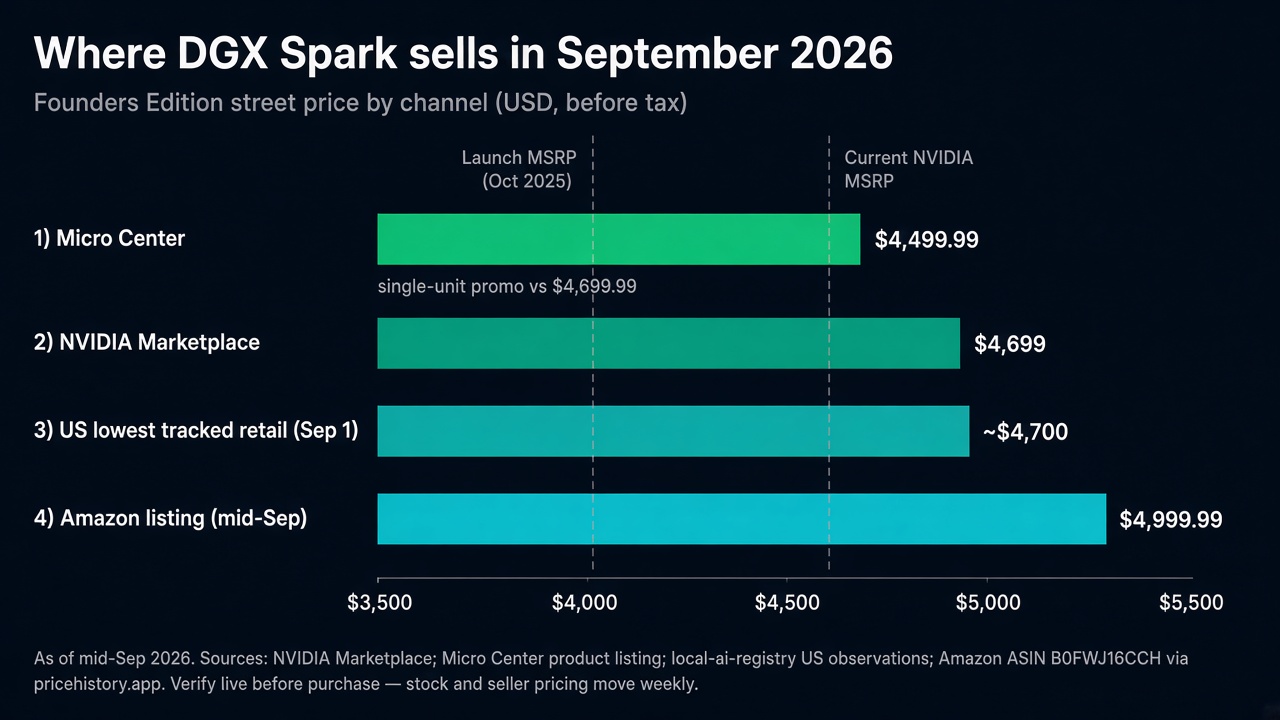
Secondary and distributor quotes run higher still. In the September 2026 availability thread, buyers report used Sparks around $4,600, distributor asks near $6,300, and some EU/CH listings well above US MSRP. OEM GB10 boxes (ASUS Ascent GX10 and peers) have their own climb — separate SKUs, same memory-pressure story.
Stock and seller pricing move weekly. Treat the table as a snapshot, not a PO.
How we got here: launch $3,999 → MSRP $4,699 → channel spread
NVIDIA started shipping Founders Edition on October 15, 2025 at $3,999. In late February 2026 it raised MSRP by $700 (~18%) to $4,699, citing LPDDR5X supply constraints (2/23/2026 announcement) — no config change, existing orders honored, other channels lagged.
Seven months later, that $4,699 MSRP is the floor on NVIDIA's own store, not the ceiling on the street. Amazon's tracked range for the same SKU spans a high of $5,449.99 (17 Oct 2025) and a low of $3,949.99 (15 Dec 2025), with a ~335-day average near $4,401 — and a mid-September 2026 print back near $5,000.
What this means for buyers: budget the live channel price plus tax/shipping, not the $3,999 figure in older reviews. A Micro Center single-unit promo can undercut NVIDIA; Amazon can sit ~$300 above. If the unit is scarce or over MSRP, run the ownership TCO and buy vs rent math against Spark Cloud from $0.85/hour.
The Cloud Alternative: What Renting Removes
If the setup and maintenance checklist above gives you pause, it is worth understanding what changes when you access DGX Spark remotely instead of owning the hardware.
Enverge Spark Cloud provides SSH and Docker access to hosted NVIDIA DGX Spark systems. The access model is the same: you SSH in, run containers, manage your own environment. The difference is what you do not manage.
| Responsibility | Physical ownership | Enverge Spark Cloud |
|---|---|---|
| Power infrastructure | You | Enverge |
| Thermal management | You (clearance, ambient temp) | Enverge |
| Driver and OS updates | You | Enverge |
| Hardware failure response | Warranty service, your timeline | Enverge |
| Dust and physical maintenance | You | Enverge |
| Availability during stock shortages | Depends on your unit | Immediate |
| Upfront cost | $4,699 | $0 |
This is not an argument that renting is always better. It is an argument that the setup and maintenance burden of physical ownership is real, and for teams where that burden matters, rental removes it entirely.
For teams that have confirmed their workload fits DGX Spark and expect sustained daily utilization, the economics of ownership eventually win. For teams still validating fit, or with intermittent usage patterns, the operational simplicity of cloud access is a genuine advantage. See the buy vs rent comparison for a full cost and scenario breakdown, or how to rent a DGX Spark for the setup flow.
FAQ
Does DGX Spark need a special power outlet?
No. DGX Spark uses the included 240W external power supply and plugs into a standard grounded AC outlet. No dedicated circuit, no 20A outlet, and no special electrical infrastructure is required. Per NVIDIA's documentation, peak measured system draw is 233.2W, which is well within the capacity of a standard 15A circuit.
Can DGX Spark run in a normal office?
Yes. DGX Spark is a small form factor desktop (150 x 150 x 50.5 mm, 1.2 kg) designed for desk-side placement. It operates within normal office temperature ranges (5°C to 30°C ideal), produces office-level noise under full compute load, and requires only a standard outlet and Ethernet connection. The only placement requirement is adequate rear clearance (40 cm) for exhaust airflow.
Does DGX Spark require special cooling or ventilation?
No special cooling is required. The unit has an integrated thermal management system. You need to maintain the specified clearances (10 cm front, 2 cm sides, 40 cm rear) and keep the ambient room temperature within the operating range. A standard air-conditioned office or home office qualifies.
How loud is DGX Spark under load?
At idle, DGX Spark is nearly inaudible. Under full sustained compute, it produces a faint airflow hum that is within normal office noise levels. Independent testing of the related Dell Pro Max GB10 system measured noise under 48 dBA at one foot during sustained workloads.
What are the ongoing maintenance requirements for DGX Spark?
Physical ownership means managing NVIDIA driver updates, CUDA toolkit compatibility, Ubuntu OS patches, NVIDIA Container Toolkit updates, and basic physical maintenance (vent cleaning, ambient temperature monitoring). For teams with infra support, this is routine. For solo researchers, it is a recurring time cost that cloud access eliminates.
What do I need to set up DGX Spark for the first time?
A standard grounded AC outlet, an HDMI display for initial setup, and an Ethernet cable. After first boot, configure SSH access and you can manage the system remotely. The NVIDIA Quick Start Guide covers the full first-boot process.
Can I use DGX Spark without a display after initial setup?
Yes. After configuring SSH access during first boot, most users interact with DGX Spark entirely over the network. A display is only needed for initial setup unless you prefer local access.
How much does a DGX Spark cost right now?
As of mid-September 2026, NVIDIA still lists Founders Edition at $4,699. Micro Center has shown a single-unit promo at $4,499.99, while Amazon for ASIN B0FWJ16CCH has printed near $4,999.99. That is up from the $3,999 October 2025 launch MSRP (raised in February 2026). Verify the live listing before you buy — channel prices move with stock.
Enverge provides cloud access to NVIDIA DGX Spark hardware for AI researchers, engineers, and teams. Starting at $0.85/hour with SSH, Docker, and the full NVIDIA AI stack — without buying the hardware upfront. Compare pricing or launch Spark on Enverge.